FREQUENTLY ASKED QUESTIONS

Audio & Video Guestbook Phone FAQs

From your first order to your next event: browse answers about our factory, audio and video guestbook phones, customization, ordering and after-sales support.

About Our Factory & Quality

Direct manufacturing, product inspections and available documentation.

Are you a manufacturer or a trading company?

We are a direct manufacturer specializing in Audio and Video Guestbook Phones. We supply wedding and event rental companies, wholesalers, retailers, and online sellers. Buying directly from our factory gives you access to factory pricing, direct technical support, and ongoing supply as your business grows.

Dan Wang

How do you ensure product quality?

Every unit is inspected and tested before shipment. We can also provide a pre-shipment testing video so you can review your order before it leaves our factory. Feedback from rental businesses and online sellers helps us continually improve product performance and reliability.

Dan Wang

What certification and testing documents are available?

Depending on the model, CE, RoHS, FCC, and UKCA documentation may be available. For applicable battery-powered models, we can also provide UN38.3 battery transport test documentation. Additional shipping-related documents may include 1.2-meter drop-test and stacking-test reports. Please share your preferred model and destination market so we can confirm the documents available for your order.

Dan Wang
Back to top ↑

Audio Guestbook Phones

Recording voice messages, storage, downloads and rental use.

How does an Audio Guestbook Phone work?

Guests pick up the handset, listen to your welcome message, and leave a voice message. When they return the handset to the cradle, the recording is saved automatically. Simply turn on the phone, check that it is ready to record, and make it available to your guests.

Dan Wang

How do I record or change the Audio Guestbook Phone's welcome message?

  1. For models with a center-button recording control, press and hold the center button for approximately six seconds until you hear a beep.
  2. Keep holding the button while recording your welcome message.
  3. Release the button when you finish. Your message will be saved automatically. Controls may vary by model; please follow the instructions supplied with your phone.
Dan Wang

How many hours of audio can it store?

The standard 8GB storage card holds approximately 134 hours of audio. Selected models include a 16GB card with approximately 256 hours of recording capacity. Actual capacity depends on the model, recording settings, and available storage space. Please contact us to confirm the storage option for your order.

Dan Wang

How do I download recordings from the Audio Guestbook Phone?

Connect the phone to your computer using a USB cable that supports data transfer. Open the phone's storage, locate the “Guest” folder, and copy the audio files to your computer. You can transfer all recordings at once, then save, replay, or share them with your customers and guests.

Dan Wang

Can I use the Audio Guestbook Phone for a rental business?

Yes. You can offer it as a standalone rental or include it in a wedding, party, event, or photo booth package. Before each event, set the welcome message, check the available storage, and make a test recording. We provide setup tutorials and usage instructions to help you prepare the equipment and guide your customers.

Dan Wang
Back to top ↑

Video Guestbook Phones

Camera, sound, wallpapers, greetings and exporting event media.

How to improve the camera quality?

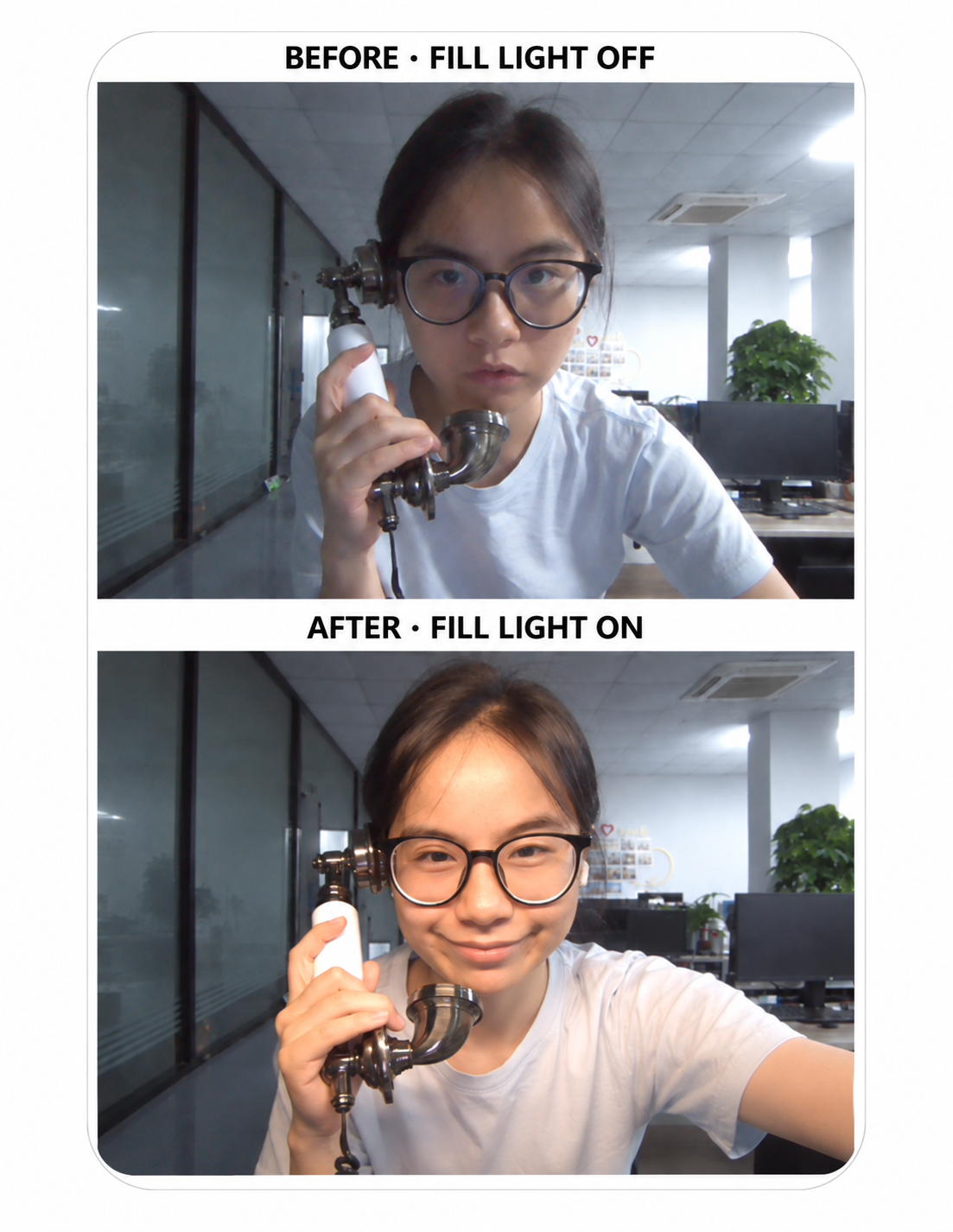
Start by adding a fill light. Place it in front of the person using the phone to light their face evenly, especially in dim venues. The comparison below shows the difference with the fill light off and on.

Video guestbook phone camera comparison: the same person with the fill light off above and with the fill light on below.
Before: fill light off. After: fill light on.
Dan Wang

How do I set up custom wallpaper on the video guestbook phone?

  1. Prepare your wallpaper in JPG/ JPEG format 800*1280px
  2. Connect the Video Guestbook Phone to PC;
  3. Open the 8908V Disk
  4. Click "SD Card"
  5. "8908V"
  6. "Captured media"
  7. "Photo"
  8. Drag your wallpaper(JPG format or JPEG format) to the folder "Photo"
  9. In the video guestbook phone.
  10. We go to the "Switch Mode" enter the initial password 8908.
  11. Then choose"settings"-
  12. “View Captured Media”-
  13. ”Photos“,
  14. then click your taget wallpaper photo
  15. and then click the album icon.
Dan Wang

How to upload pre‑edited greeting videos to the video guestbook phone?

  1. Prepare your videor in MP4 format 800*1280px
  2. Connect the Video Guestbook Phone to PC;
  3. Open the 8908V Disk
  4. Click "SD Card"
  5. "8908V"
  6. "Host Greeting"
  7. "Video"
  8. Drag your greeting video to the folder "Video"
  9. Back to the video guestbook phone.
  10. We go to the "Switch Mode" enter the initial password 8908.
  11. Then choose"settings"-
  12. “Host Greeting”-
  13. "Gallery",
  14. then click your target greeting video
  15. and then click the Set As
Dan Wang

How do I set idle‑mode display ad photos on the video guestbook phone?

  1. Prepare your Ads Pictures in JPG/ JPEG format 800*1280px
  2. Connect the Video Guestbook Phone to PC;
  3. Open the 8908V Disk
  4. Click "SD Card"
  5. "8908V"
  6. "Ads"
  7. "Photo"
  8. Drag your Ad photo (JPG format or JPEG format) to the folder "Photo"
  9. Back to the video guestbook phone.
  10. We go to the "Switch Mode" enter the initial password 8908.
  11. Then choose"settings"-
  12. “Ad Settings”-
  13. "Image Ads",
  14. then long press your target Ads photos, could choose multiple options
  15. and then choose "Mark As Ad"
Dan Wang

How to configure ad videos for idle‑mode playback on the video guestbook phone?

  1. Prepare your videor in MP4 format 800*1280px
  2. Connect the Video Guestbook Phone to PC;
  3. Open the 8908V Disk
  4. Click "SD Card"
  5. "8908V"
  6. "Ads"
  7. "Video"
  8. Drag your video to the folder "Video"
  9. Back to the video guestbook phone.
  10. We go to the "Switch Mode" enter the initial password 8908.
  11. Then choose"settings"-
  12. “Ad Settings”-
  13. "Video Ads"
  14. Click "Mark as Ad"
Dan Wang

How can I disable idle‑mode ad videos on my video guestbook phone?

  1. Prepare your videor in MP4 format 800*1280px
  2. Connect the Video Guestbook Phone to PC;
  3. Open the 8908V Disk
  4. Click "SD Card"
  5. "8908V"
  6. "Ads"
  7. "Video"
  8. Drag your video to the folder "Video"
  9. Back to the video guestbook phone.
  10. We go to the "Switch Mode" enter the initial password 8908.
  11. Then choose"settings"-
  12. “Ad Settings”-
  13. "Video Ads"
  14. Find out the ad video that has a "Set" Green hint on the top left
  15. Click "Mark as Ad"
Dan Wang

How do I capture and safely save guest messages during events with the video guestbook phone?

  1. Audio guestbook phone, just pick up the handset and say something, digital, capable, more messages left at the same time than writing down, with more info like emotion and remind you of all the old day memories when you hear your loved one's voice.
  2. Video guestbook phone, upgrade from audio guestbook phone. So many people agreed with the idea and now pick up the handset you can leave videos!
Dan Wang

Do you provide wallpapers and templates for the Video Guestbook Phone?

Yes. We regularly update wallpapers, promotional screen designs, and selfie overlay templates for our Video Guestbook Phones. These designs help you personalize the screen for weddings, parties, branded events, and rental bookings. Customized templates can also be discussed based on your model and requirements.

Dan Wang
Back to top ↑

Customization & Branding

Private labeling, packaging and custom product projects.

Can you add my logo or customize the packaging?

Yes. We support private labeling and packaging customization for businesses building their own guestbook phone brand. Please share your preferred model and branding requirements so we can discuss the available options.

Dan Wang

Can you customize product functions, appearance, or on-screen templates?

Yes. For projects that require more than branding, we can discuss changes to product functions, appearance, and on-screen templates. Available customization options depend on the model and project requirements. Contact us with your ideas so we can review what is possible.

Dan Wang
Back to top ↑

Ordering & Business Partnerships

Customers, pricing, shipping and long-term factory supply.

Who are your guestbook phones designed for?

Our Audio and Video Guestbook Phones are suitable for couples and families collecting personal memories, as well as businesses offering event services or selling guestbook equipment. Our business customers include wedding and event rental companies, photo booth operators, wedding planners, wholesalers and distributors, retailers, and e-commerce sellers. Whether you need a phone for one celebration or equipment for a growing rental business, we can help you choose a suitable model.

Dan Wang

How do you support repeat orders and long-term business customers?

We support repeat orders with ongoing factory supply, direct technical assistance, product tutorials, and warranty service. As your business grows, we can also discuss private labeling, customized templates, and new product development. You work directly with the manufacturer for your initial order and future replenishment.

Dan Wang
Back to top ↑

After-Sales Support & Warranty

Setup guidance, technical assistance and one-year warranty.

Do you provide setup instructions and technical support?

Yes. We provide setup tutorials, usage instructions, and direct technical assistance to help you prepare and use your guestbook phone. If you need help, contact us with your model and a description of the issue so we can assist you.

Dan Wang
Back to top ↑